This is the English reading version of the Dutch news item ScanRuler: browser-gebaseerde 3D-metrologie voor je scans.
ScanRuler is a free, open-source web application by CNC Kitchen for measuring and comparing 3D scans. It runs entirely in the browser at scanruler.com, with no installation required and your files never leaving your computer.
What ScanRuler does
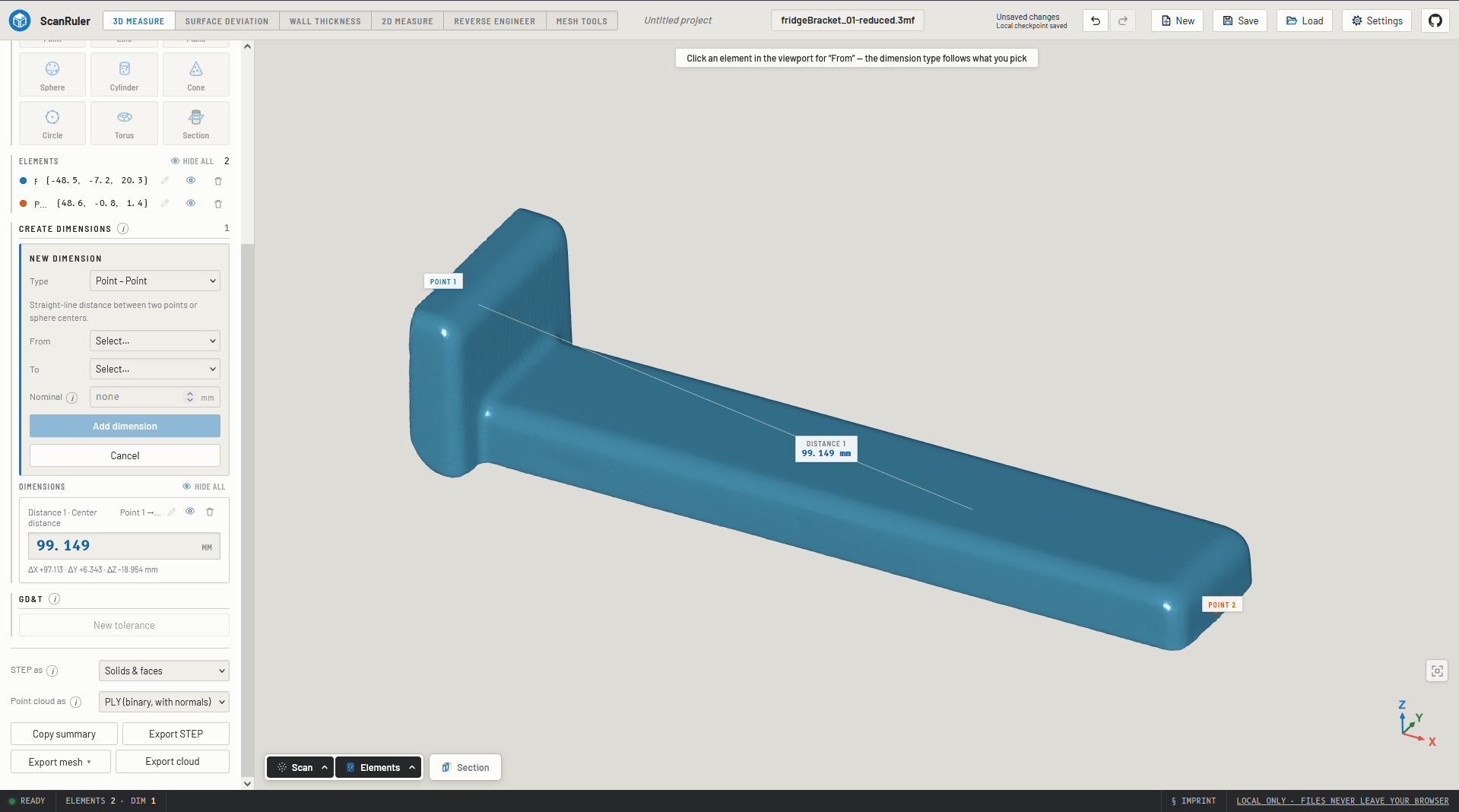
The tool has three workspaces that share the same loaded scan:
- 3D Measure: automatically fit spheres, cylinders, and planes to selected points on your scan. Build measurement points, lines, and planes from them, and extract distances and angles between them. You can also check tolerances (flatness, parallelism, coaxiality) and align the scan via a 3-2-1 alignment. Results can be exported as STEP files.
- Deviation: color a deviation map over your scan. You can see how far the part deviates from the nominal CAD model (load a mesh or STEP file) or from a single fitted element: is this plane flat, is this hole round? The map can be played as an animation, scaled, and looped so you can see which direction the part has deformed.
- Thickness: measure the wall thickness of the part itself, without a reference model and without alignment. Just load one file and measure.
Practical details
ScanRuler accepts STL, PLY, and OBJ files (meshes only) for scans. STLs have no units, so you are asked what the unit is (mm, cm, m, inch) when opening. PLY and OBJ are read in millimeters. Reference CAD models in the Deviation workspace also accept STEP files.
Everything runs locally in your browser — your scan files are never sent to a server. There is an undo/redo system that works across all workspaces (Ctrl+Z / Cmd+Z). For new users there is a step-by-step hint that stops showing after two visits.
Projects are saved as a single .scanruler file (a zip containing the scan, the reference model, and a project.json with all measurements, alignments, and settings). Additionally, changes are saved locally every two seconds as a recovery point in this browser.
My verdict
ScanRuler is an original program, not a copycat “vibecoded” app like so many others. I tested it in the browser myself, and you can immediately see that real work went into it. The downside is that the interface feels clunky and it takes considerable effort to actually get anything done with it. Tools like this prove again that FreeCAD add-ons or workbenches become less interesting to build: you can easily build a standalone app yourself, as we wrote earlier. Keep an eye on this site for updates and tests.